SEOSpace Plugin for Squarespace: Features, Pricing & Review
If you’ve ever opened an SEO tool before, you’ve probably seen a dashboard full of errors and red scores staring at you. Messages like “add keywords” or “optimize your meta descriptions” that make you think: great, but what does that actually mean?
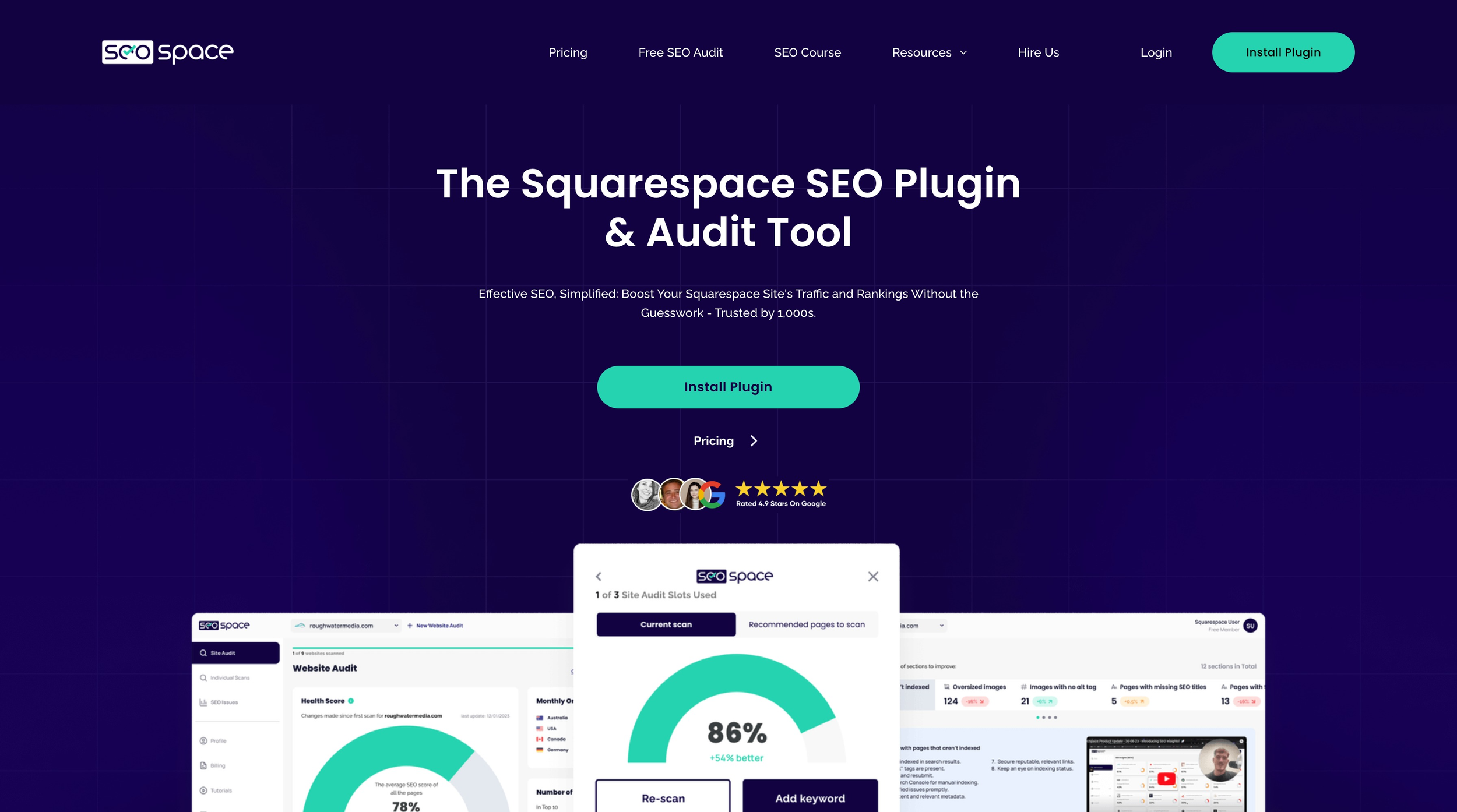
SEO software is made for agencies and experts who already know what to do with that information. The SEOSpace plugin works like a personal SEO expert by scanning your pages, showing you exactly what needs attention, and giving you clear instructions on how to fix it.
In this post, we’ll walk you through how SEOSpace works and why it’s a tool worth considering if you run your business on Squarespace.
This post contains affiliate links. If you click and make a purchase, we might earn a small commission at no extra cost to you. We only recommend products we love and trust. Read our affiliate disclosure.

The Kalina Squarespace template for portfolios.
What Makes the SEOSpace Plugin Different?
Imagine you’ve just published a new service page. Almost immediately, the doubts creep in: did you choose the right keyword? Did you use it too little, or too much? Should it sit in the heading, the description, or both? Is the URL clean enough? And are your images helping or slowing your site down?
You could spend hours trawling through blog posts and tutorials trying to find answers. The SEOSpace plugin replaces uncertainty with clear, page-level guidance. For example, it might suggest shortening a URL so it’s keyword-friendly, or rewriting a meta description so it includes your keyword in under 160 characters. SEOSpace tells you what you need to change, and exactly how to do it.
Why Should You Use SEOSpace?
The SEOSpace plugin brings the essentials of SEO into one place, simplifying tasks that usually feel technical or scattered across multiple platforms:
Keyword research
Discover the exact terms your audience is searching for, so you’re not guessing what to optimize for.
On-page optimization
Get page-specific guidance, right down to how often to use your keyword and where it should appear.
Image resizing
Large files can slow down your site. SEOSpace flags them and lets you fix the issue directly, keeping pages fast and user-friendly.
Meta data checks
Review titles and descriptions for every page, with clear instructions on how to improve them for both clarity and search engines.
URL slugs
Ensure your links are short, clean, and keyword-based .
Backlink analysis
See which sites are linking to you and identify opportunities to build authority through new connections.
Instead of opening five different tools and piecing together a strategy, SEOSpace keeps everything clear, in one place.
Who is SEOSpace For?
SEOSpace was built with Squarespace users in mind, especially small business owners who want their site to be visible without becoming SEO experts.
It’s a practical fit if you’re a creative, a coach, a consultant, or anyone running a values-led business online.
It helps you:
Make your website discoverable without hiring an SEO agency.
Work page by page with clear direction, instead of guessing.
Keep SEO healthy in the background while you focus on serving your clients.
SEOSpace is about finding sustainable visibility through consistent SEO improvements.
Is SEOSpace Worth It?
From the perspective of both a designer and a business owner, SEOSpace earns its place. SEO often feels mysterious, and many SEO platforms come with a steep learning curve and dense dashboards.
The SEOSpace plugin translates SEO into guided, page-level actions, which means that as a business owner, you can work through clear, manageable adjustments.
For us as professionals, it also support managing multiple client websites. SEOSpace functions as an ongoing monitoring layer, helping surface issues early and maintain consistency.
Instead of treating optimization as a large, overwhelming or occasional task, it becomes something you can review and refine in stages. That shift makes SEO feel more sustainable, particularly for small businesses.
That said, SEOSpace is not universally necessary. If your website is extremely small, rarely updated, or if search visibility is not a meaningful growth channel for your business, this might not be a tool you need to add to your arsenal.
But if organic traffic, discoverability, and ongoing optimization are part of your strategy, SEOSpace provides a structure that makes SEO feel more actionable.
A Studio Founded Client Case Study
We recently partnered with a coaching client to ensure their Squarespace website we designed was optimized for search. Using SEOSpace, we audited each page, refined metadata, adjusted URL slugs, optimized keyword usage, and resized images to improve performance.
Within the first 30 days of launch, the site brought in 80 organic newsletter signups, achieved a 20% click-through rate on key pages, and ranked in the top 8 on Google for her core keywords. This visibility opened up new opportunities, including a feature on a leading podcast in her industry.
A Guide to SEOSpace Pricing
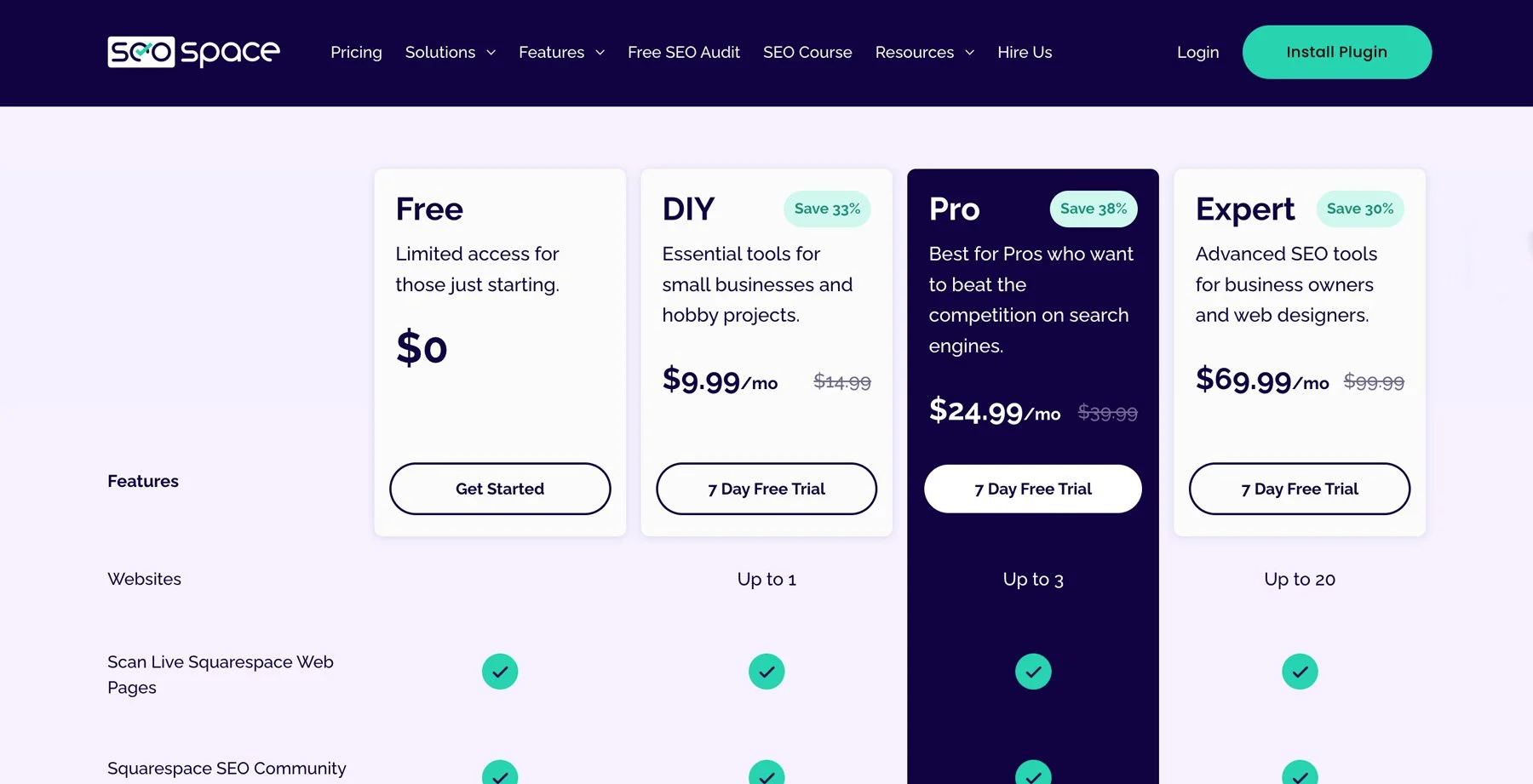
SEOSpace uses a straightforward subscription model with tiered plans to suit different needs, from solo site owners and small business websites to professionals and agencies managing multiple clients.
Here’s a breakdown of what to expect:
Free Plan
A no-cost option that lets you explore basic features and see how the tool works before committing. It allows you to scan live Squarespace pages and access the SEOSpace community and tutorials, making it a useful starting point if you’re new to SEO tools.
DIY Plan
$9.99/month (billed annually) or $14.99/month (billed monthly)
Designed for individual site owners and smaller websites, the DIY Plan supports:
• One website
• Automatic site audits (up to 100 pages)
• Monthly monitoring and reports
• Keyword research and blog suggestions (limited credits)
Features such as rank tracking, backlink analysis, AI visibility, and local SEO tools are available as optional add-ons.
Pro Plan
$24.99/month (billed annually) or $39.99/month (billed monthly)
This plans adds more advanced optimization features and deeper insights, a good fit for professionals who need richer data and guidance across growing content:
• Up to three websites
• Larger site audits (up to 500 pages)
• Monthly monitoring
• Increased research credits
Like the DIY Plan, certain advanced tools remain optional add-ons, allowing flexibility based on your specific SEO needs.
Expert Plan
$69.99/month (billed annually) or $99.99/month (billed monthly)
Built for professionals, consultants, and agencies, the Expert Plan introduces:
• Up to twenty websites
• Unlimited site audits
• Weekly monitoring
• Built-in keyword rank tracking
• Backlink analysis
• AI visibility tools
• Local SEO tools
• PDF reporting
• White-label reports
• Priority support
This tier is designed for users managing SEO across multiple projects rather than a single business website.
All plans offer a 7-day free trial so you can test out the platform.
Because pricing can change over time and new promotions or tiers might appear, it’s a good idea to check SEOSpace’s official site for the most current pricing information.
SEOSpace vs Squarespace’s Built-In SEO Tools
Squarespace gives you the essentials you need to tell search engines what your site is about: page titles, meta descriptions, clean URLs, image alt text, and automatic sitemap generation. For most sites those basics are enough to get found for branded terms and local searches.
The SEOSpace plugin doesn’t replace those native capabilities, but it builds on them with actionable guidance and automation that turns those blank boxes into strategic decisions. For example:
Page-level recommendations
Squarespace shows you where to enter a title and description. SEOSpace tells you what’s missing, what’s too long, and how to improve clarity and relevance.
Keyword guidance
Native Squarespace doesn’t analyse keywords. SEOSpace evaluates your content against keyword targets and tells you where to optimize.
Image performance flags
While Squarespace lets you add alt text and tells you when it’s missing, SEOSpace highlights large files that slow your site and suggests fixes.
URL slug health checks
Squarespace lets you customize URL slugs, but SEOSpace helps you make sure those slugs are strategically aligned, concise, and keyword-friendly.
Backlink insights
Squarespace doesn’t offer backlink analysis. SEOSpace helps you understand who’s linking to you and where opportunities lie.
When You Might Not Need SEOSpace
If your site is very small (just a couple of pages), you’re not actively pursuing search visibility, or you’re comfortable manually navigating SEO best practices, Squarespace’s native controls may be enough.
But if you want:
• clear next steps instead of guesswork
• ongoing insights into how you can optimize
• a guided workflow rather than a checklist
SEOSpace bridges that gap.
New: The SEOSpace Academy
Alongside the tool, SEOSpace offers a completee SEO course. The Academy walks through the mechanics of building a sustainable strategy, from keyword research and page structure through to metadata, backlinks, and content development.
The course begins with foundations, helping you understand what influences rankings and where most websites underperform. From there, it moves into how to identify keywords, structure pages strategically, and build content that supports long-term discoverability.
There are also dedicated modules covering:
On-page optimization
Backlink strategy
Blogging for organic traffic
Local SEO
Conversion-focused thinking
The role of AI in search
Selling SEO services
Taken together, the tool and the course complement each other. The tool shows you exactly what to change, and the course helps you understand why those changes matter and how to apply that knowledge across your business.
My Experience With the SEOSpace Academy
Having completed the course myself, I found it that extended well beyond beginner-level material. I’m by no means a beginner to SEO, but the Academy offered a deep strategic perspective on both traditional optimization and AI SEO. The lessons around keyword research, content structuring, and “money pages” were particularly useful.
Personally, my interest was in AI-driven search and optimization, which has become increasingly important for my own business and client projects. The Academy provided insights while also reinforcing the core SEO principles that remain essential.
Henry Purchase, the founder of SEOSpace, has an incredible depth of experience. There’s a noticeable difference between learning from general SEO resources and learning from someone working extensively within the Squarespace ecosystem.
This is not a course limited to beginners. For those new to SEO, it offers a structured and accessible entry point. For more experienced practitioners, it provides refinement, perspective, and often unexpected insights that sharpen existing knowledge.
FAQs
-
Yes. SEOSpace is designed to be guided and accessible, particularly for users who may find traditional SEO platforms overwhelming. The interface focuses on clear, page-level recommendations rather than dense technical dashboards.
-
No. While SEO familiarity is always helpful, SEOSpace is built to support users without specialist expertise by translating optimization into actionable steps.
-
No. Squarespace provides foundational SEO controls such as page titles, meta descriptions, and URL slugs. SEOSpace builds on these by auditing content, identifying issues, and guiding improvements.
-
No SEO tool can ethically guarantee rankings. SEOSpace provides analysis, monitoring, and guidance on optimization. Results depend on competition, keyword selection, and consistent implementation.
-
Yes. SEOSpace includes keyword research tools and content guidance designed to help you choose the right keywords and show you where to place them in pages and content.
-
Yes. Features such as image analysis and resizing help identify elements that may negatively affect page speed and user experience.
-
Yes. Plan tiers determine how many sites you can manage, making it suitable for both individual business owners and professionals handling multiple client projects.
-
SEO improvements rarely produce instant results. SEOSpace supports ongoing optimization, and outcomes typically emerge over time as changes are indexed and rankings evolve.
-
Traditional SEO platforms offer deep analytical data suited to specialists. SEOSpace focuses on guided optimization workflows tailored specifically to Squarespace users.
-
Yes. SEOSpace uses a flexible subscription model that allows users to upgrade, downgrade, or cancel as needed.
Concluding Thoughts
SEO can feel abstract when you’re running a small business. You know it matters, but between client work, creative projects, and day-to-day admin, digging into keyword density or metadata often slides down the list. The SEOSpace plugin streamlines the technical side of SEO so you can act quickly, and the course builds the understanding so you can keep improving over time.
Together, they create a system that supports quick wins and long-term growth. You don’t need to become an SEO expert, but if you want to, the pathway is there. Either way, you’re building a foundation where your website isn’t just a portfolio, but a discoverable space that continually works for your business.
You may also like:
The Complete Guide to Squarespace SEO & AIO
A Guide to Avoiding Burnout With Squarespace Automations
How to Setup and Style the Squarespace Announcement Bar
Shop Squarespace Templates





Continue Reading